Case Study: Inline Authoring for Decision Tables
Elevating decision logic from a workflow feature to a reusable platform capability
2024 – Staff Product Designer
Role and scope
Role: Staff-level Product Designer operating at Principal scope Environment: Internal enterprise platform at ServiceNow
Focus: System framing, platform strategy, interaction model, and cross-team alignment
Execution: Individual design ownership with close Product and Engineering partnership
Overview
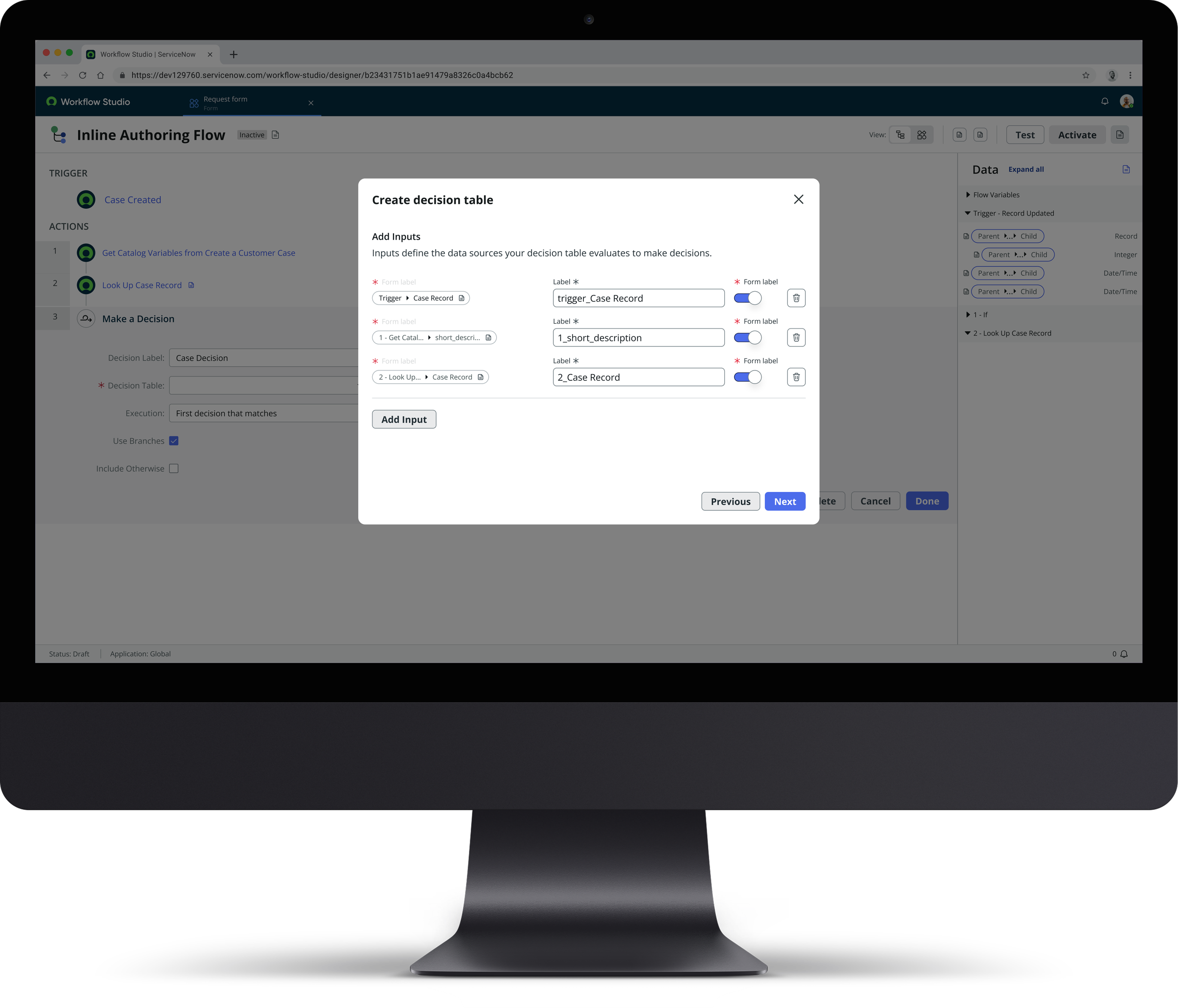
At ServiceNow, I led design for Inline Authoring of Decision Tables so builders could define logic structure without leaving flow authoring context. The prior workflow required switching into a separate tool to create table structure, then returning to complete flow wiring. That friction didn't need to exist. I designed an inline setup path focused on inputs, outputs, and core metadata, allowing teams to scaffold valid decision-table objects directly in context. The model was intentionally constrained to fast structure definition rather than full rule authoring, with deeper logic editing continuing in Decision Builder where needed.
The Problem
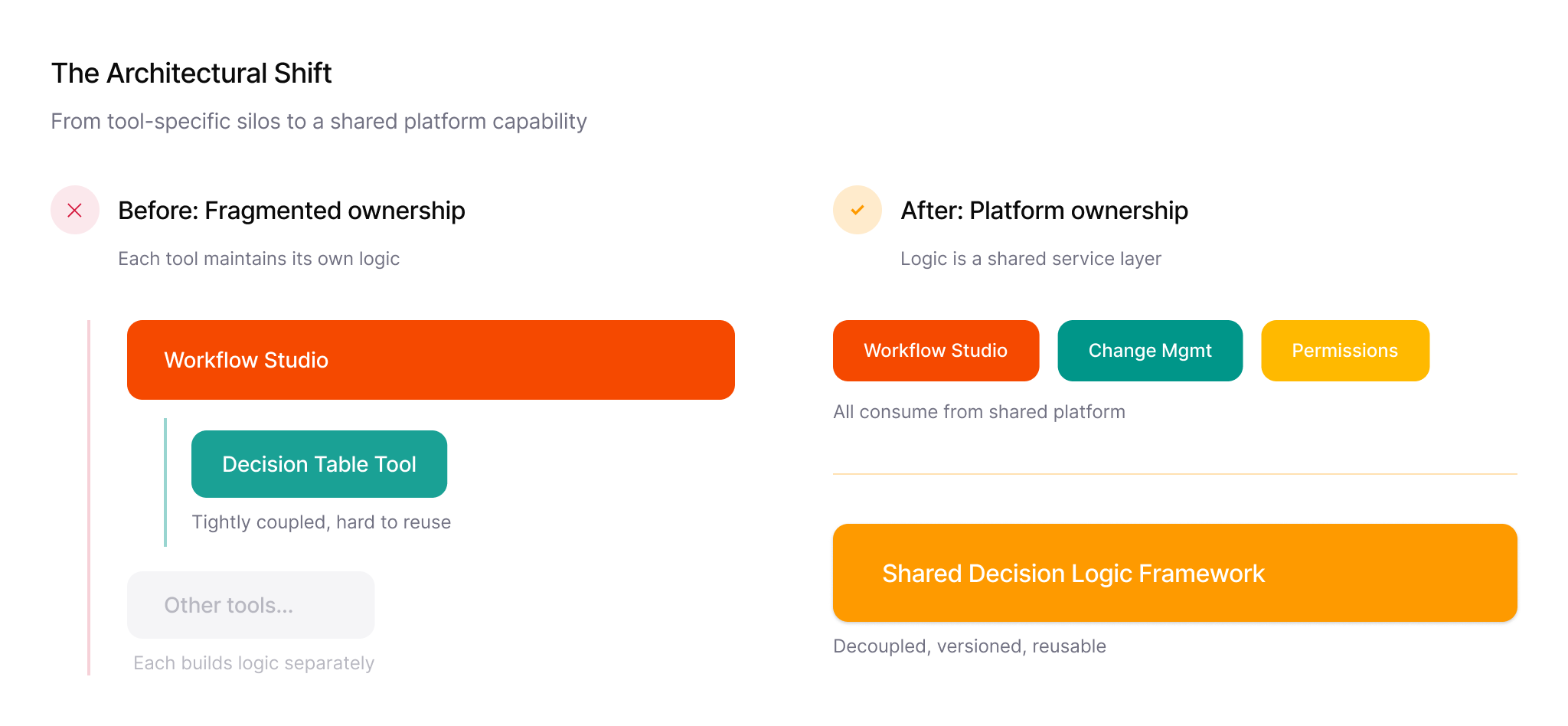
Decision tables were powerful but underutilized. They enabled complex, non-scripted logic inside workflows, and the users who found them loved the product. It was outperforming comparable features on a per-user basis. But the authoring experience lived outside the workflow context in a separate tool. If you wanted to create a new decision table from within Flow Designer, clicking "new" opened a completely different builder in a new tab with a different UI, different interaction patterns, and no shared context. Users who didn't already know the tool would land in an unfamiliar environment and abandon.
Over time, this concentrated usage among power users and discouraged broader adoption. The system worked, but only for a narrow group, which conflicted directly with the original intent of decision tables as an accessible alternative to scripting. Leadership had identified this gap: high value per user, low total adoption. The mandate was to close it.
Planning the System
My PM and I co-led several weeks of user interviews with advanced decision table users before scoping the project. What we discovered was that power users were hacking the tool, using scripts and workarounds to extract more capability from decision tables than the product was designed to support. They saw it as a general-purpose logic engine, not just a workflow accessory.
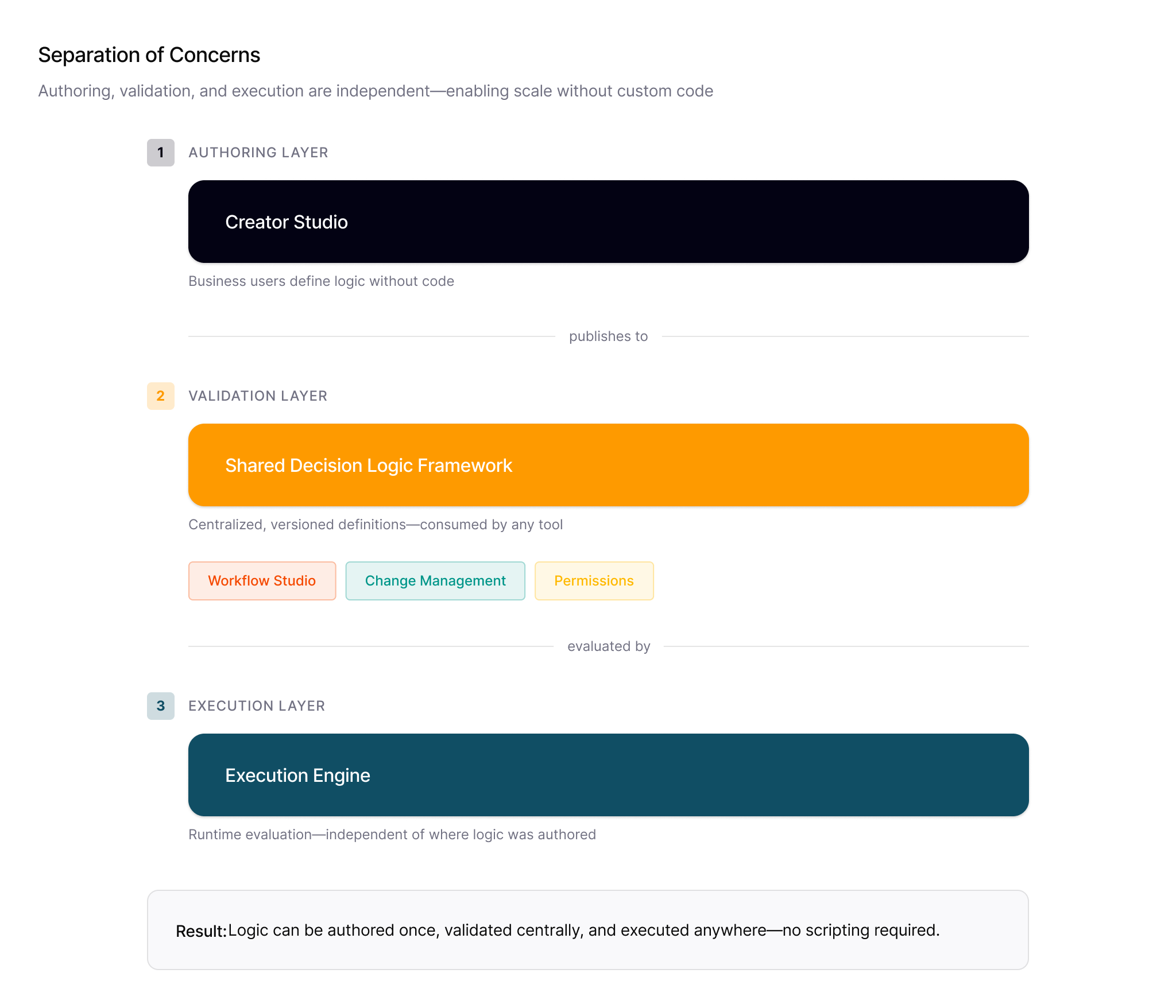
That research fed into a cross-discipline workshop with PM, engineering, and other stakeholders to define the next phase of the product. In that workshop, I introduced the question of scope: rather than just solving the immediate feature request (inline creation in Flow Designer), could we build an authoring component that was reusable beyond our own suite of tools? The platform had use cases in change management, permissions, and other domains where the same encapsulated logic pattern applied.
We explored three placement approaches for the inline experience: an embedded panel within Flow Designer, a sidebar, and a modal overlay. The panel was rejected because the two builders used different technology stacks. We couldn't embed one inside the other without significant refactoring. The sidebar had similar constraints. The modal worked because it allowed one technology stack to overlay the other cleanly, and critically, a modal-based component could be deployed anywhere on the platform without rebuilding UI for each host context.
This reframing connected directly to what leadership had already asked for: more adoption, more discovery, more ways for customers to use the tool. The broader scope wasn't a hard sell. It was a direct answer to an existing mandate.
We validated the direction by returning to the original research participants with the expanded concept. They started providing specific use cases for cross-platform deployment, which helped shape the roadmap.
Design Goals
We needed to allow Decision Table setup directly inside Flow Designer. The feature needed to focus on inputs, outputs, and basic metadata, not full rule logic. The solution had to work inside the existing modal architecture without requiring large refactors. Visuals and interactions needed to match the rest of the flow builder environment. And the component needed to be self-contained enough that other teams could adopt it without rebuilding the experience for their context.
What I Designed
The core design insight was identifying the contract between decision tables and wherever they execute. A decision table has three parts: inputs, decision rows (the logic matrix), and outputs. The full logic can be complex, but the contract (what goes in and what comes out) is simple and consistent. I designed the inline experience around just that contract.
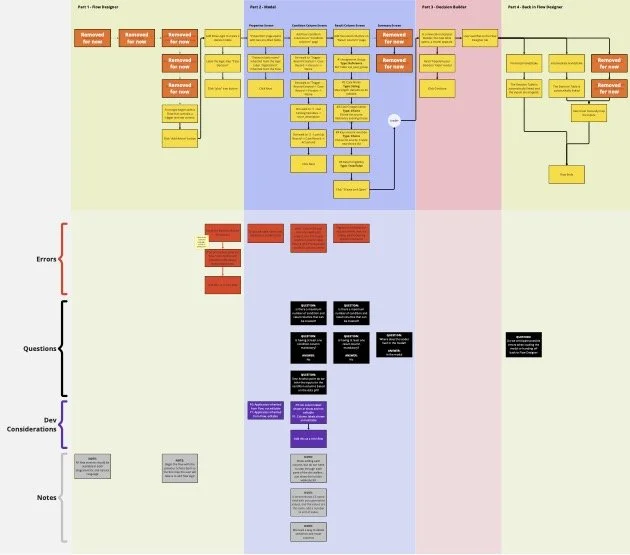
Users define inputs one at a time with inline validation. Each input has a data type, and the form enforces type correctness as you go. The form slides up as fields are added, with collapsible sections for completed inputs so the modal doesn't become unwieldy. We capped the inline experience at five inputs and five output columns, a constraint driven by both the modal's spatial limits and engineering constraints around concurrent data loading. Platform data showed the average use case was roughly three inputs and four outputs, so the cap fit the majority of real workflows.

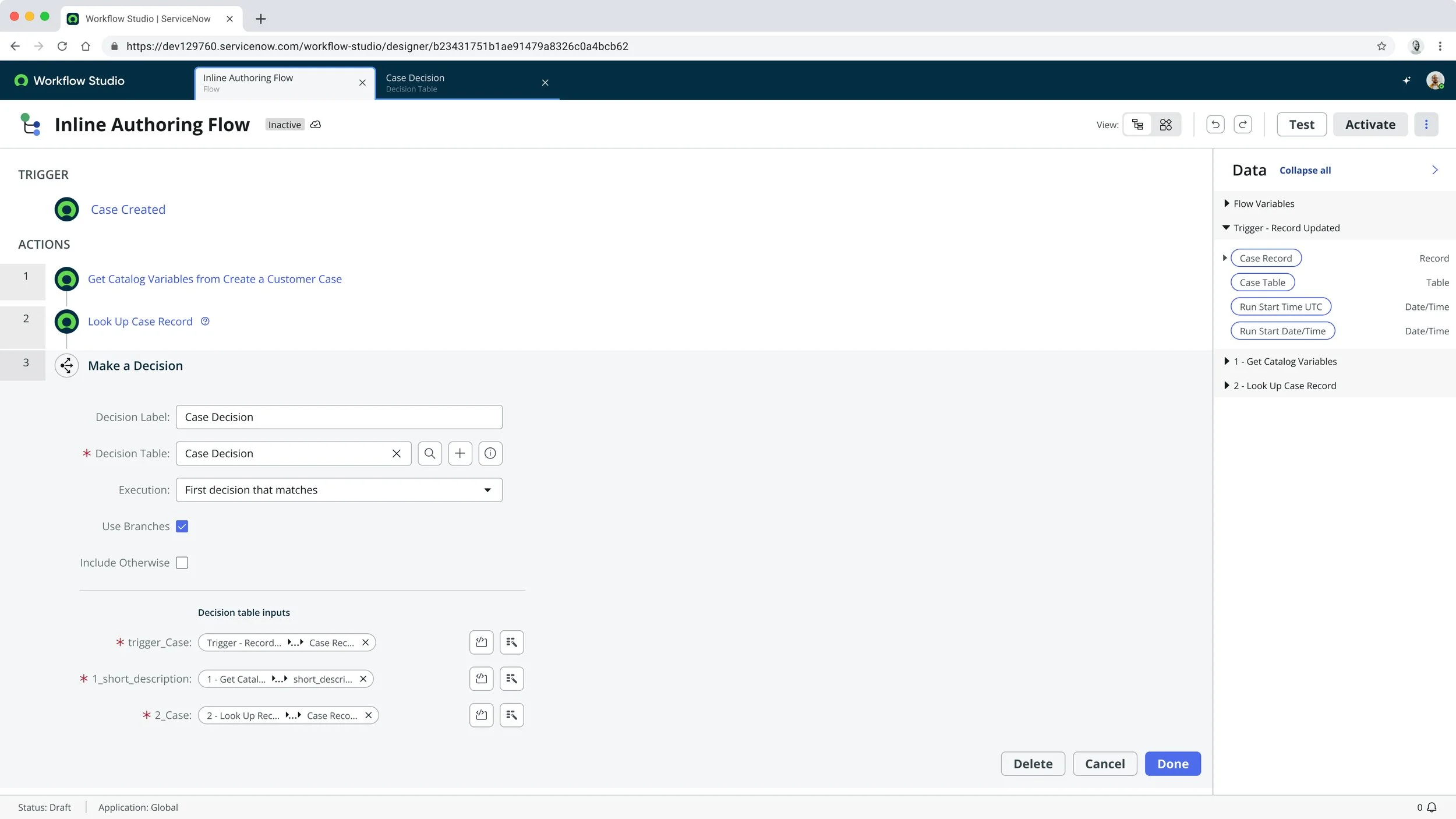
If a user hits the cap, error messaging directs them to the full Decision Builder to continue. No dead end, just a clear handoff point. Once the user completes the input/output structure, the system creates a valid but incomplete Decision Table and opens a new tab to Decision Builder with a confirmation modal, a "handshake" acknowledging the table exists but still needs logic authored.
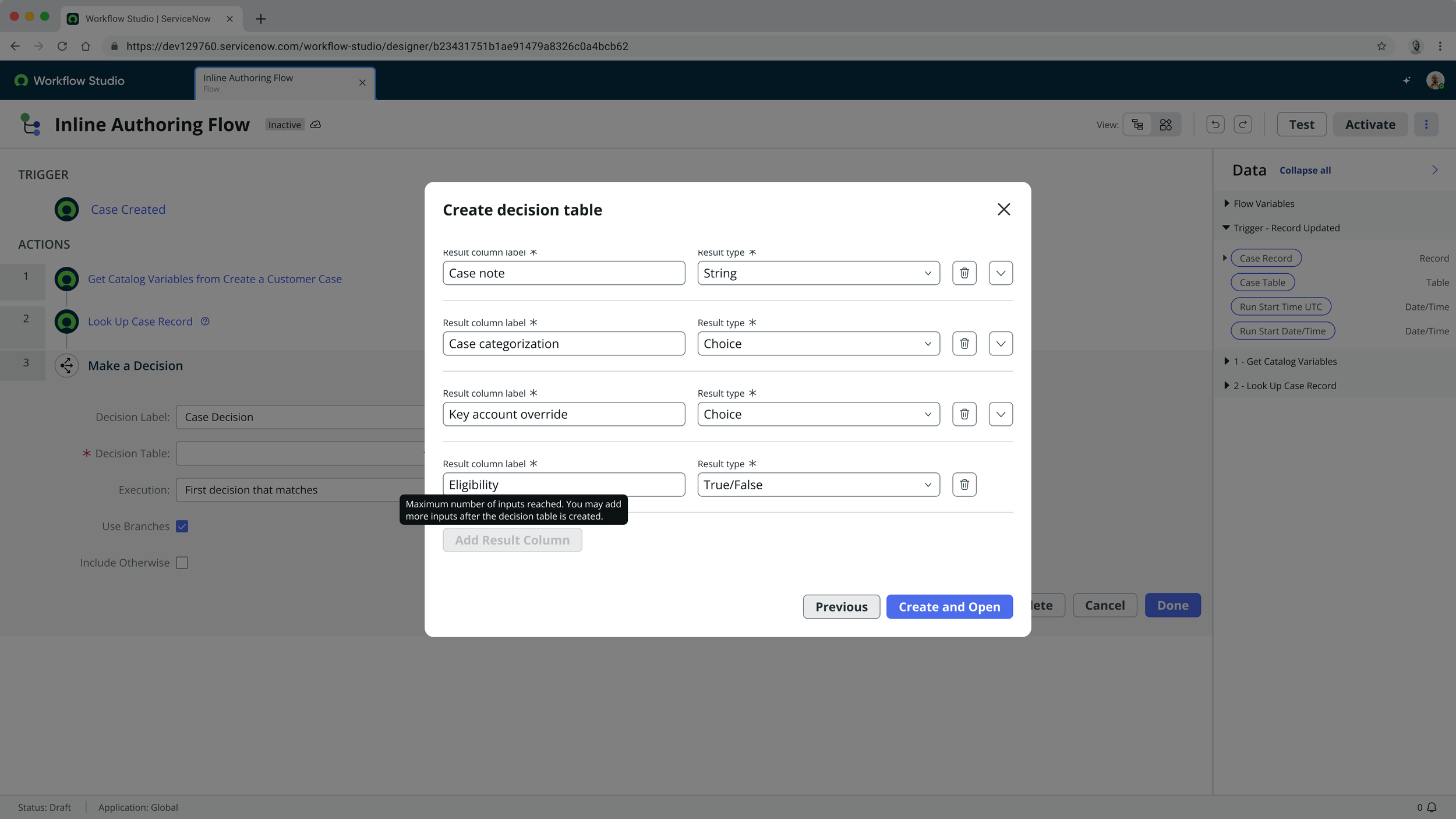
This handoff model also enabled delegation. A flow author could define the contract, specifying what the table needs to accept and return, and then hand the actual rule authoring to a teammate who specializes in building decision logic. The inline creation isn't just about one user's efficiency; it enables division of labor between flow authors and logic authors.
Constraints
The Flow Designer architecture is tightly coupled to modal interactions. Full embedded authoring was not possible due to engineering cost and technology stack differences between the builders. The new feature had to be compatible with existing Decision Table data models. Multiple teams owned adjacent tools, which required careful coordination. Any solution needed to deliver near-term usability gains without creating long-term platform debt.
Outcomes
This shipped as part of a multi-release Decision Builder evolution. Vancouver introduced testing and draft/publish workflows. Washington DC integrated Decision Builder into Workflow Studio. Xanadu expanded inline creation in flows/subflows and added deeper workflow integration points, including playbooks.
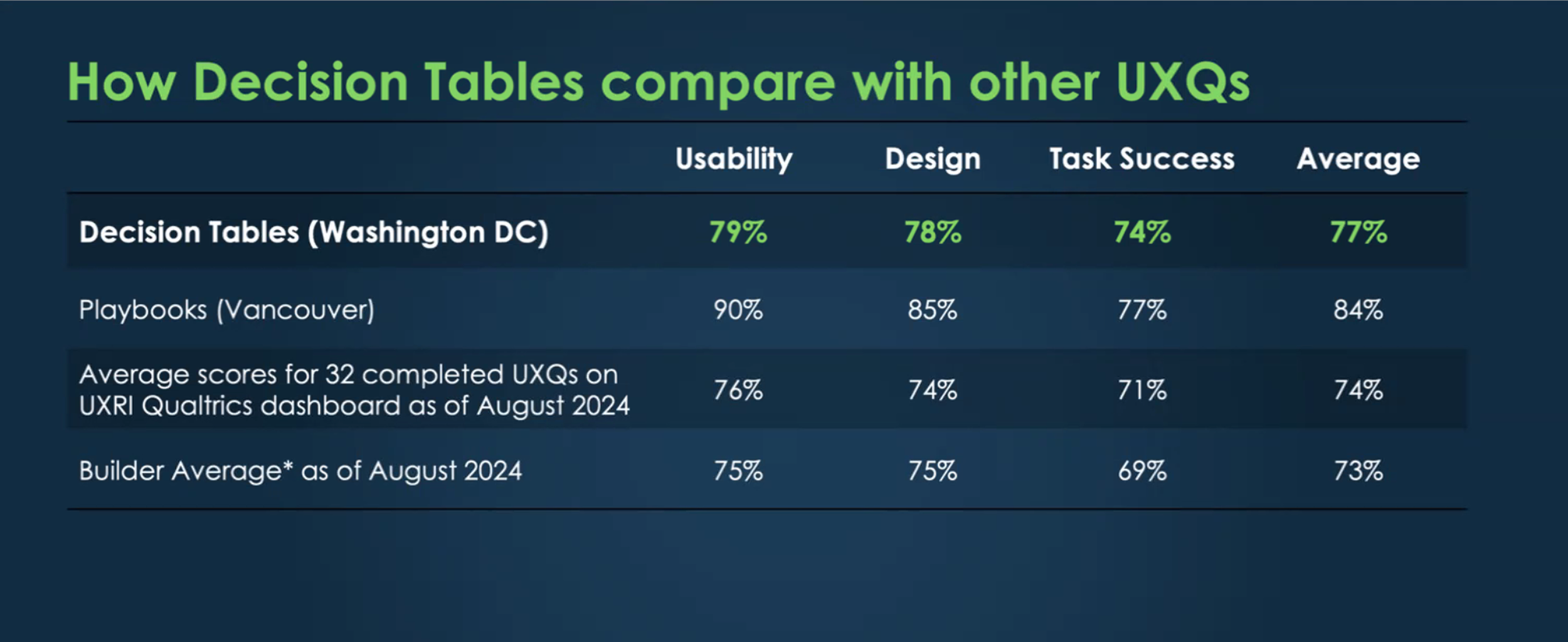
Decision Tables reached a 77% UXQ score versus a 68% platform average, ranking in the top three platform capabilities. The draft-to-publish model prevented unintended changes to live decision logic, reducing the risk of production issues from in-place editing.
The inline authoring feature reduced friction for users who needed to define decision logic while building a flow. Decision Tables became more visible and approachable within Flow Designer. The contract-first approach helped teams delegate rule authoring without blocking flow development, reducing dependency bottlenecks and making automation more modular. The inline pattern also informed broader planning for logic authoring consistency across adjacent workflow tools.
Conclusion
This project started as a narrow feature request (let users create decision tables without leaving Flow Designer) and grew into a platform-level component. The key decisions weren't about the modal UI. They were about identifying the right abstraction (the input/output contract), choosing an implementation approach that didn't lock us into one host context (the self-contained modal), and connecting the technical opportunity to an existing business mandate (closing the adoption gap). The work aligned with ServiceNow's broader low-code and workflow unification direction, and the patterns established here created a baseline for future inline configuration across the platform.